3D Text Effect: Transform Flat Typography into High-Impact Masterpieces
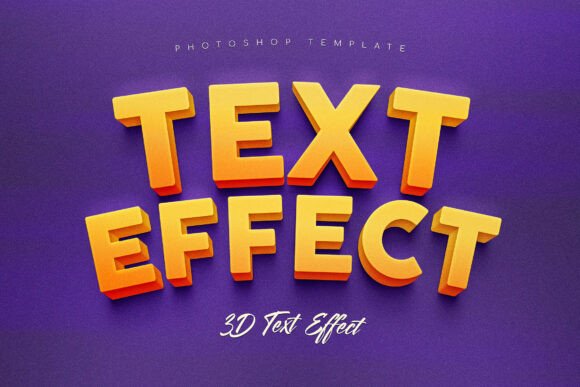
In the crowded digital landscape, static text often fails to capture attention. Users scroll past generic headlines and flat designs without a second thought. To break through this visual noise, designers need more than just bold fonts; they need depth, volume, and a sense of physical presence. This is where the 3D Text Effect becomes an essential tool for modern creatives. By moving beyond simple drop shadows and basic gradients, this premium Photoshop asset allows you to transform flat typography into powerful, high-impact 3D masterpieces that command the viewer's eye.
The primary challenge facing graphic designers today is creating content that feels tactile and substantial in a two-dimensional medium. Whether you are building a brand identity or designing a marketing campaign, the goal is to create a "heroic" look that suggests durability and importance. A flat design can feel temporary or lightweight, whereas a well-executed 3D effect implies weight, structure, and permanence. The 3D Text Effect addresses this specific need by engineering realistic side-extrusions, directional lighting, and ambient occlusion shadows. These elements work together to create a true sense of physical space, making your text appear as if it exists within a real environment.
Overcoming the Limitations of Standard Design Tools
Many designers struggle to achieve professional-grade 3D results using standard Photoshop tools alone. Creating realistic extrusions manually requires hours of layer manipulation, precise perspective calculations, and complex rendering settings. Even with advanced skills, maintaining crisp edges at large scales can be difficult. The result is often text that looks artificial or pixelated when printed on large formats like billboards or banners.
The 3D Text Effect eliminates these technical hurdles by providing a smart-layer system engineered for efficiency. Designed at a high resolution of 4500 x 3000 px, this template ensures that your 3D edges remain sharp and clean, even in large-scale prints. The built-in intelligence automatically calculates perspective and light fall-off, handling complex vector shapes and bold fonts with ease. This means you do not need to be a 3D modeling expert to achieve a weighty, built-to-last aesthetic. You simply apply the effect, and the system handles the heavy lifting of geometry and lighting physics.
Practical Applications for Every Industry
The versatility of this asset makes it suitable for a wide range of practical applications. Different users approach typography with different goals, but the outcome is always a more engaging visual experience. Here is how various professionals can leverage the 3D Text Effect to solve their specific design challenges:
- Sports Brands and Athletes: For sports marketing, energy and power are paramount. The massive volume created by this effect adds a sense of impact and aggression to team names, slogans, and jersey numbers. It transforms simple lettering into something that feels like it could withstand a collision, perfectly aligning with the ethos of competitive sports.
- Cinematic Movie Titles: Film posters require titles that evoke atmosphere and scale. By utilizing the realistic lighting and deep shadows provided by the 3D Text Effect, designers can create movie titles that feel cinematic and immersive. The depth adds a narrative layer, suggesting that the story behind the text is as substantial as the visual presentation.
- High-Energy Marketing Banners: In digital advertising, click-through rates depend on immediate visual interest. A flat banner often gets ignored, but one with a tactile, 3D appearance stands out in a feed. The ambient occlusion shadows help the text pop off the screen, drawing the user's gaze directly to the call-to-action.
- Tech and Gaming Products: Technology brands often rely on sleek, futuristic aesthetics. The precision of the 3D extrusion allows for a clean, engineered look that mirrors the sophistication of hardware products. It bridges the gap between software interface design and physical product packaging.
How to Implement and Maximize Results
Implementing the 3D Text Effect is designed to be seamless for both beginners and seasoned professionals. The package includes four high-quality PSD templates, ensuring you have options for different styles and moods. Because the files utilize Smart Objects, you can resize and edit your text without losing quality. This flexibility allows you to test different font weights and sizes instantly, observing how the lighting and depth react to changes in character density.
When approaching a project, consider the context of your final output. If you are designing for print, the 300 DPI specification guarantees that every curve and corner will be rendered with studio-quality clarity. For web use, the same high-resolution source allows you to downscale the image without introducing artifacts, ensuring the text remains crisp on high-density Retina displays. The PDF included with the download provides font links and step-by-step instructions, removing any guesswork from the setup process.
Users should also consider the psychological impact of depth. Studies in visual perception suggest that humans respond more positively to objects that appear to have volume and shadow. By adding realistic depth, you are subconsciously signaling to the viewer that the information presented is important and trustworthy. The 3D Text Effect leverages this principle to elevate the perceived value of your design.
Technical Specifications and Requirements
To get the most out of this asset, ensure your workflow is compatible with the provided specifications. The template is optimized for Adobe Photoshop CC, taking advantage of the latest rendering engines and layer management features. The dimensions of 4500 x 3000 px provide ample canvas for detailed work, while the layered PSD format allows for granular control over individual components like the extrusion, the face, and the lighting layers.
It is important to note that this is not a filter that applies a generic preset. Instead, it is a comprehensive system that mimics the behavior of physical materials. The smart-layer system handles the complexity of vector shapes, meaning that whether you are using a thin sans-serif font or a thick slab serif, the effect adapts to maintain structural integrity. This adaptability is crucial for maintaining a professional look across diverse branding guidelines.
Conclusion: Elevate Your Visual Communication
In a world saturated with digital content, standing out requires more than just good ideas; it requires excellent execution. The 3D Text Effect offers a practical solution to the common problem of flat, unengaging typography. By providing realistic depth, dynamic lighting, and professional dimension, it empowers designers to create visuals that resonate with audiences on a deeper level.
Whether you are crafting a bold sports logo, a dramatic movie title, or a high-converting ad banner, this tool delivers a tactile, heroic look that commands attention. With its high resolution, smart-layer architecture, and comprehensive documentation, it removes the technical barriers to entry, allowing creativity to take center stage. Stop settling for flat designs and start building typography that has the weight and presence to truly make an impact.